
We see many news reports on customers being cheated by retailers. We are explaining the best way to find a Dell Laptop is Original or Fake. The point is no need to visit the Dell Showroom. Laptops are used for many Personal and professional jobs. So it is crucial to check the authenticity of the device. A customer always desires to understand the purchased product’s genuineness.
Many factors are related to the genuineness of the product. Sometimes users get the wrong product delivered. Maybe sometimes they will get fake or defective Products. In some rare cases, customers were also fooled by delivery agents by used or first-copy products.
Steps to Check whether your Dell laptop is Original or Fake
Luckily Dell has an official tool to check whether your Dell laptop is Original or fake. The free tool is available on Dell’s Official website.
STEP 1: Click on the below Dell official website Link (Official Dell Tool to check the authenticity of your product)
https://www.dell.com/support/home/yu/en/yubsdt1?app=warranty
This link will take you to the page Warranty and Contracts on Dell’s Official Website.
STEP 2: Find the Dell Service Tag or Dell EMC product ID, This can be found on the backside of your Dell Laptop or any Dell product. Enter the Service tag or Dell EMC Product ID and Submit.
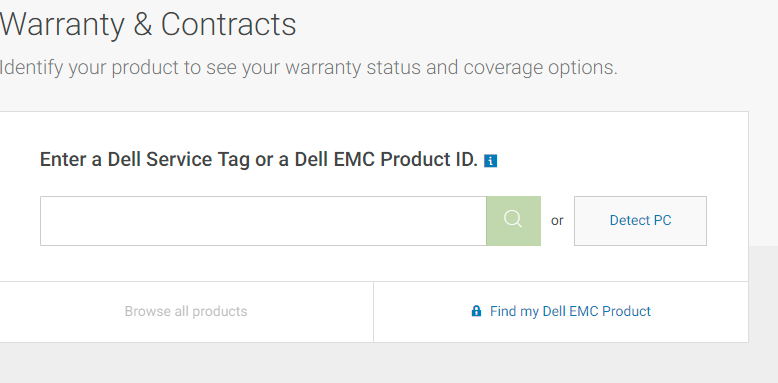
STEP 3: Your Laptop Model and service Tag will be listed. Along with the Warrant Details including the Ending date of the Warranty. This verifies that the laptop or the Dell product you own is genuine.

If You Can’t find the Service Tag or Dell EMC product ID.
Click on the Detect PC button. Dell will run a check and detect your PC. The Service tag and Other details will be then listed.
If the Service Tag or EMC ID doesn`t return any result or Dell`s software cannot detect your PC, then you need to be concerned as the product may not be a genuine one.
What to do If Dell fails to detect the product?
You can contact the retailer and ask for verification or you can take the laptop to the nearest Official Dell authorized Service centre for further assistance.
In this way, you can officially check whether your Dell laptop is original or Fake. We recommend you verify the authenticity of the Dell products that you use for your personal and business purposes.
Conclusion
Today’s scenario is where most of the daily tasks occur through laptops. Especially, bank transactions, personal photos, and documents. etc. So it is important to verify the authenticity of your laptop. Using a fake one may even open the doors for hackers. Another thing is the manufacturer will also not be able to provide you with a warranty for the product.
It is appreciable, that Dell is providing an option to check the product information on their official website. This is the best way to check whether a Dell Laptop is Original or Fake without going to the official Dell Store.
QA
How can I check if my Dell laptop is genuine or not?
How can I know if my laptop is original or not?
How do I know if my Dell laptop is new or used?
Tags: Check Dell warranty, Dell authenticity code check how to check the generation of Dell laptop, Dell laptop purchase date check, Dell serial number check, Dell product authentication, Dell service tag check