
Lets discuss how to remove windows OS from another drive without formatting. In another words, steps to Remove and Uninstall Windows 7, Windows 8, or Windows 10 from Dual Boot PC. Windows is the most popular operating system in the globe. Sometimes, you may want to remove Windows OS from another drive due to some issues. In this case, you should follow vital steps before proceeding further for sure. It is possible to remove your Windows operating system from another drive and you do not have to go for formatting. You can even have a back up of your data while removing Windows OS from another drive.
With so many options available on several websites, it becomes difficult to go through the real steps. You should be very careful while considering any steps for removing Windows OS from another drive for sure. Are you looking for the vital steps you need to follow for removing Windows OS without formatting? If yes is your answer, then here you would come to know about all the details.
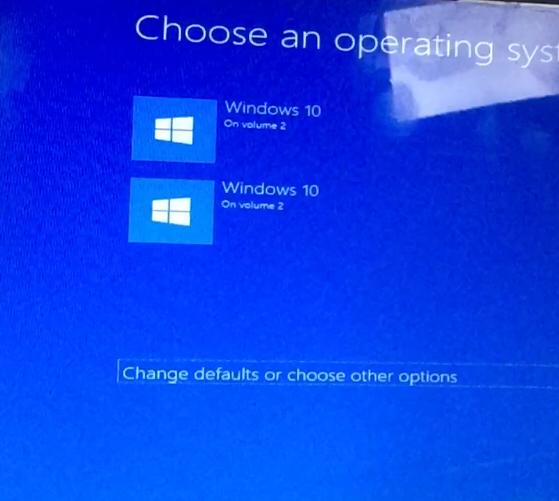
The first step you need to follow is to remove Windows 10/7/8 boot entry and all its system files. To remove boot entry, you should follow the below steps
- Press Windows +R keys
- Now you need to type msconfig and hit enter
- Now you should select Windows 10/7/8 and select “Delete”
- You should delete all the Windows directory from your drive (C, D, E)
- After deleting all the Windows directory, the drive should get the Windows space without formatting
Also, you can easily follow the given instructions to solve your issue
- First, you should right-click on “My Computer” and choose “ Properties”
- After choosing properties, you need to choose “Advanced System Settings” from the left menu
- Now you should select “Settings” default operating from the Windows “System Properties”
- In “System”, you can choose your Windows 10/7/8 as the default book and un-check “Time” to display lists of OS.
After performing all the above-mentioned steps, the boot entry process will be done and you would be able to format or erase the partition used by the Windows which you want to completely remove from the system. You can even format it if you prefer to plan to reuse that partition to install another OS or delete the entire volume if you want or use that space to extend other partitions. If you are formatting the drive without removing the Windows 10 boot loader files or without assigning other OS boot loader as default, you would not be able to process boot-up for sure.
Finally, you are aware of the vital steps you need to follow for removing Windows OS from another drive without formatting. You just need to remove Windows 10/7/8 boot entry and its system files. It would be better to save your important data and files so that you will never lose them in case anything happens. You should always be on the safer side before trying anything for the first time. Make sure you are following all the above-mentioned steps before proceeding further.
Conclusion
Just try from your end and share your valuable experiences here with us right now!
Best of luck Guys
Also, read
Windows 10 upgrade Tool-Easy tool to Update your current windows
FAQ
How to Remove and Uninstall Windows 7, Windows 8, or Windows 10 from Dual Boot PC
Author




Sijo Thomas is a web developer, SEO-focused content creator and digital tools builder at Smart Web Solutions. He creates practical web tools, technology guides and helpful online resources covering web development, WordPress, SEO, artificial intelligence and everyday digital solutions. His work focuses on making technology easier to understand and providing useful, user-friendly solutions for individuals and businesses.
LinkedIn:https://www.linkedin.com/in/sijo-thomas-it-seo-and-dm/