
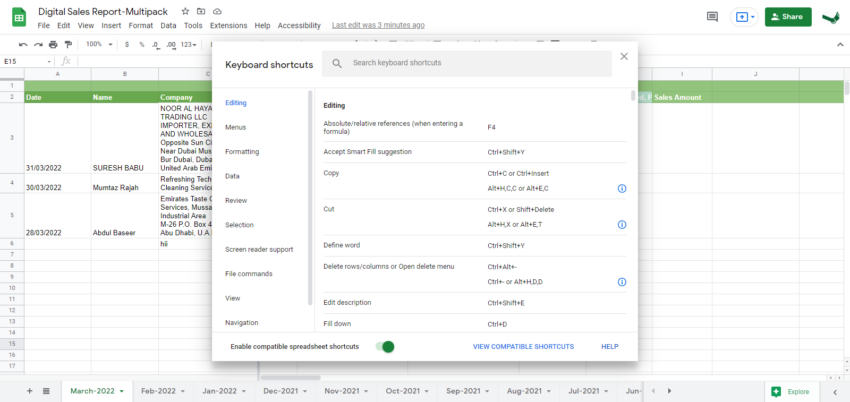
Let’s see Commonly Used Google spreadsheet shortcuts For Daily Works.
| Open | Ctrl + o |
| Ctrl + p | |
| Copy | Ctrl + c |
| Cut | Ctrl + x |
| Paste | Ctrl + v |
| Paste values only | Ctrl + Shift + v |
| Newline in a cell | Ctrl + Enter |
| Select column | Ctrl + Space |
| Select row | Shift + Space |
| Select all | Ctrl + a Ctrl + Shift + Space |
| Undo | Ctrl + z |
| Redo | Ctrl + y Ctrl + Shift + z F4 |
| Find | Ctrl + f |
| Find and replace | Ctrl + h |
| Fill range | Ctrl + Enter |
| Fill down | Ctrl + d |
| Fill right | Ctrl + r |
| Save (automatic Save or press the shortcut) | Ctrl + s |
| See common keyboard shortcuts | Ctrl + / |
| Add new sheet | Shift + F11 |
| Bold | Ctrl + b |
| Underline | Ctrl + u |
| Italic | Ctrl + i |
| Strikethrough | Alt + Shift + 5 |
| Center align | Ctrl + Shift + e |
| Left align | Ctrl + Shift + l |
| Right align | Ctrl + Shift + r |
| Apply top border | Alt + Shift + 1 |
| Apply right border | Alt + Shift + 2 |
| Apply bottom border | Alt + Shift + 3 |
| Apply left border | Alt + Shift + 4 |
| Remove borders | Alt + Shift + 6 |
| Apply outer border | Alt + Shift + 7 or Ctrl + Shift + 7 |
| Insert link | Ctrl + k |
| Insert time | Ctrl + Shift + ; |
| Insert date | Ctrl + ; |
| Insert date and time | Ctrl + Alt + Shift + ; |
| Format as decimal | Ctrl + Shift + 1 |
| Format as time | Ctrl + Shift + 2 |
| Format as date | Ctrl + Shift + 3 |
| Format as currency | Ctrl + Shift + 4 |
| Format as percentage | Ctrl + Shift + 5 |
| Format as exponent | Ctrl + Shift + 6 |
| Clear formatting | Ctrl + \ |
| Navigate spreadsheet | |
|---|---|
| Move to beginning of the row | Home |
| Move to begin of sheet | Ctrl + Home |
| Move to the end of the row | End |
| Move to the end of the sheet | Ctrl + End |
| Scroll to the active cell | Ctrl + Backspace |
| Move to the next sheet | Alt + Down Arrow |
| Move to the previous sheet | Alt + Up Arrow |
| Display a list of sheets | Alt + Shift + k |
| Open hyperlink | Alt + Enter |
| Open Explore | Alt + Shift + x |
| Go to the side panel | Ctrl + Alt + . Ctrl + Alt + , |
| Hide row | Ctrl + Alt + 9 |
| Unhide row | Ctrl + Shift + 9 |
| Hide column | Ctrl + Alt + 0 |
| Unhide column | Ctrl + Shift + 0 |
Related Queries:
What are the shortcuts in Google Sheets?
Hope the Google spreadsheet shortcuts help you to do better work online.