

Let’s see the importance of Flush DNS Cache on Chrome. “Have you ever encountered issues like websites not loading properly or changes in domain addresses not reflecting? If yes, such problems might be due to a cluttered DNS cache in your Chrome browser. However, you need not worry any longer since by cleaning the DNS Cache on Chrome; you can easily get through this. Here’s all about “How to Clear DNS Cache on Chrome?” Let us walk you through the simple steps to clear the DNS cache on your Chrome browser.
A DNS cache is a temporary storage of website addresses. Its role is to help your browser load sites faster. However, with time, when the DNS cache becomes overloaded, corrupted, or outdated, it adds delays to the browsing experience. Therefore, it is important to keep clearing DNS Cache every now and then for a smooth and uninterrupted browsing experience on Chrome. Whether you’re a tech-savvy user or just starting out, keep reading the article till the end to get the most out of it. Here’s all about Cleaning DNS Cache on Chrome:
What is a DNS cache?
DNS Cache stands for Domain Name System Cache. It is essentially a storage of recent DNS lookups that your browser keeps handy.
As a user enters a website’s URL into their browser, it needs to find the corresponding IP address to locate and load the website’s content. The browser sends a request to the DNS server asking for the IP address of the URL. However, instead of asking a DNS server for the IP address every single time, the browser stores these IP addresses in its cache temporarily. This way, instead of going through the whole lookup process again, when users revisit the same website or other sites that use the same resources, their browser can quickly retrieve the IP address from its cache.
No matter how much it speeds up the loading of websites, over time, the Cache records either become incorrect or outdated. This, as a result, either does not load the website properly or brings other issues around. That’s when clearing the DNS Cache becomes important.
How to Clear DNS Cache on Google Chrome?
Although Google Chrome isn’t an operating system, it does keep a DNS cache. The DNS Cache on Google Chrome is separate from the one stored in your operating system.
Users who have Google Chrome as their main browser will need to clear DNS Cache from their Chrome as well. Here is the step-by-step process for the same:
- Firstly, launch your Google Chrome Browser.
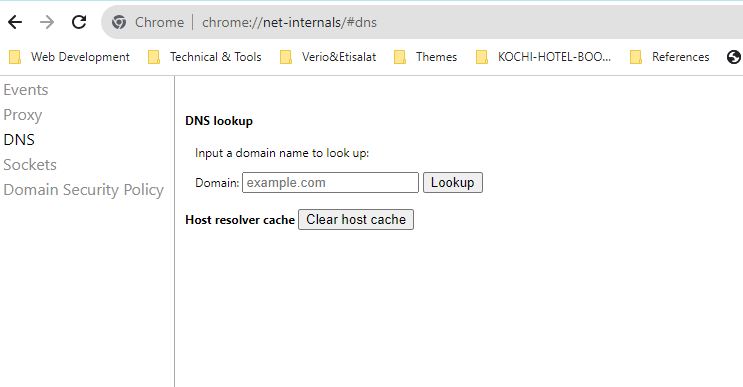
- Now, on the browser’s address bar, copy + paste chrome://net-internals/#dns, and press Enter.
- Now click on ‘Clear Host Cache,’ and it will clear up the DNS Cache.
Bottom Line…
This was all about Flush DNS Cache on Google Chrome. The process is pretty simple and straightforward, and even a novice can get through it. Besides regulating a smooth browsing experience, clearing DNS Cache also helps in preventing phishing schemes or other attacks on your computer. Not just that, but it also directs users to the most up-to-date versions of their frequently visited websites.
Since now you know how to clear DNS Cache, make sure you clear yours’ regularly.