Menu
tech and non-tech tips
  • Home
  • General
  • Web Tips
    • Web development
    • PHP
    • zendframework
    • SocialEngine
    • SQL
    • javaScript
  • Internet
  • Free Web Tools
  • Contact Us
tech and non-tech tips
WhatsApp Logo

WhatsApp Voice Call-Set Custom Ringtone For Each User

Posted on 30th April 201930th April 2019 by Sijo Thomas

WhatsApp is a well-known social app for instant messaging in social media. Facebook acquired WhatsApp in 2014 to keep the company’s leadership in social media and mobile messaging. Now WhatsApp is a sister concern of facebook. The main feature of WhatsApp is the secure delivery of messages without any time delay. Low internet Usage is another reason for the higher popularity of WhatsApp. In February 2015, WhatsApp voice call feature introduced. First in the USA applied this feature. Nowadays voice call is available in almost all countries. Only the problem depends on the countries telecom rules The countries like UAE, Saudi is blocking WhatsApp call. People bypassing it by using VPN services.

This messaging App always trying to add new features to grab users. User Customization is determining the long-term success of the product. In WhatsApp voice call feature, users can set a ringtone for each user. This helps the phone owner to identify the calling person. Depends on priority, he/she can pick or not pick the call.

STEPS To set a custom ringtone for WhatsApp voice call users in iOS
1. Launch WhatsApp from your Home screen.
2. Tap the contact you wish to select a custom ringtone.
3. Tap the name on the top of the screen.
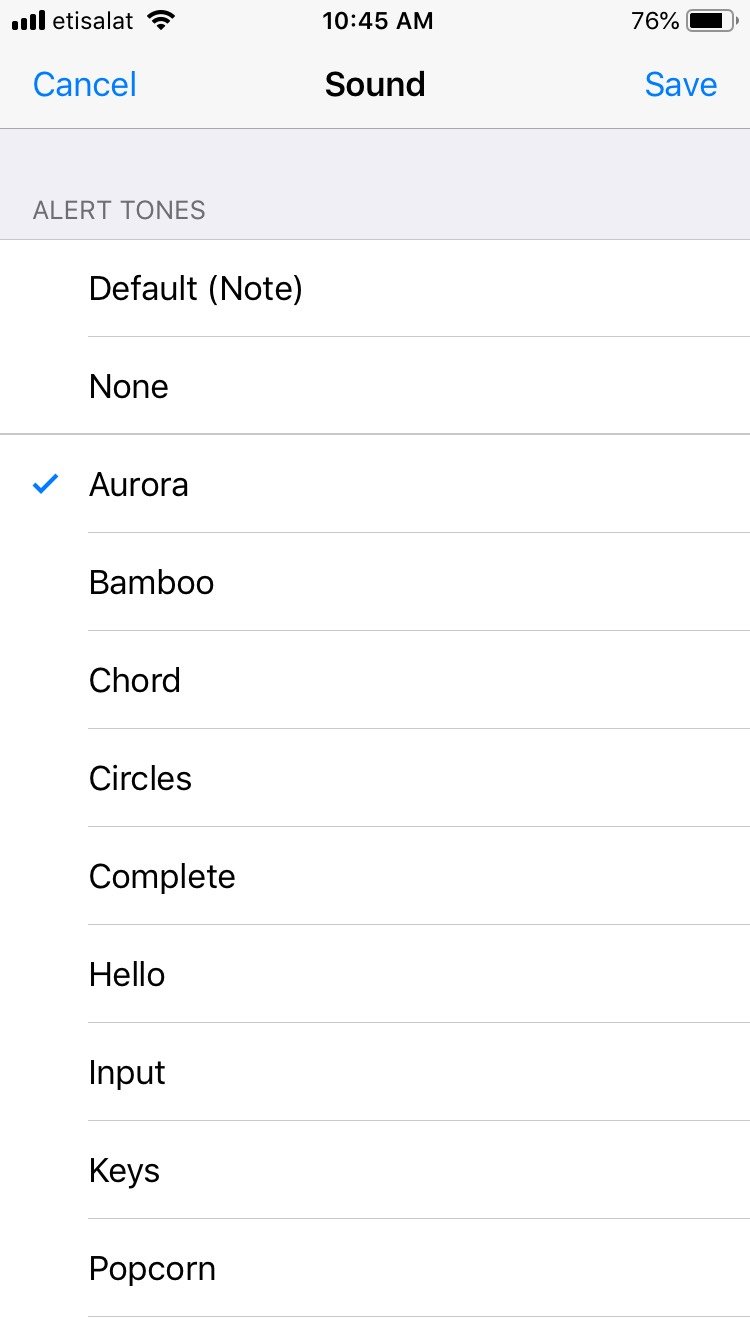
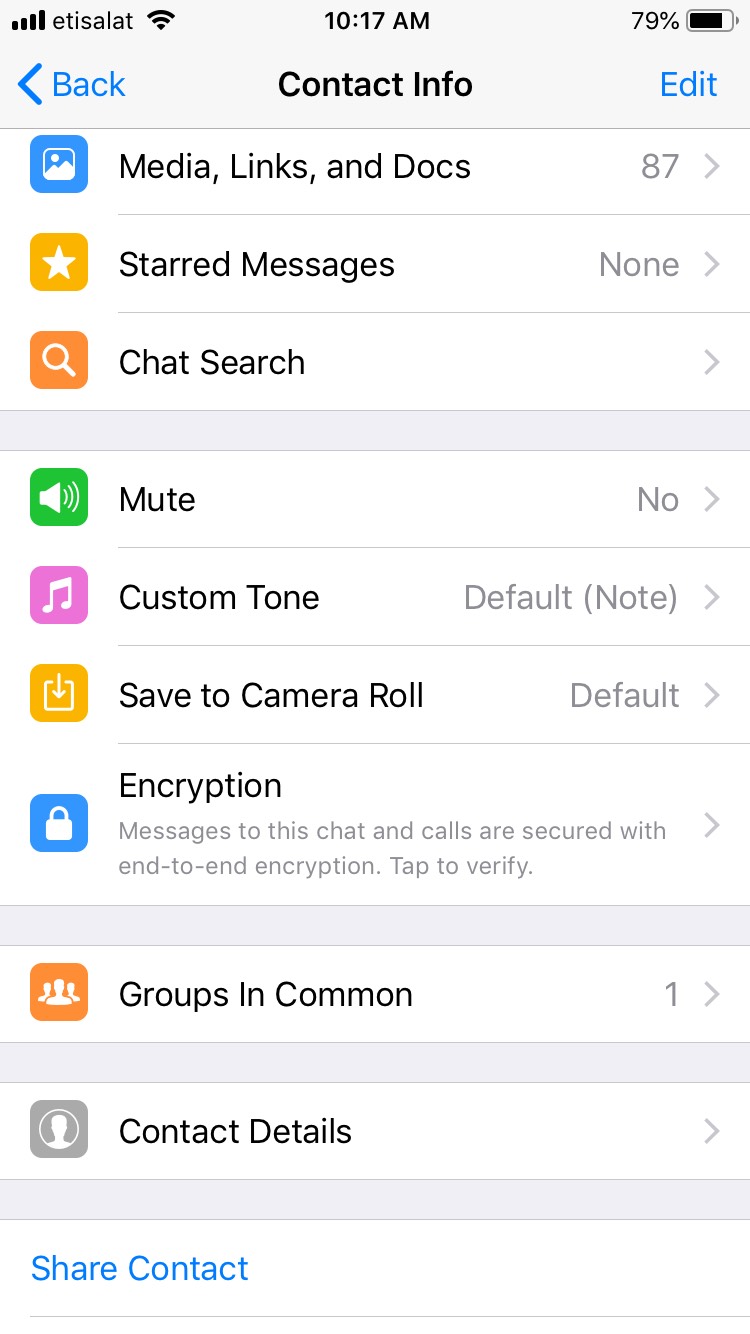
4. Tap on the Custom Ring Tone
5. Choose sound.
Restart your WhatsApp

STEP:1
WhatsApp voice call custom tone

STEP:2

WhatsApp voice call custom tone

Ringtones are the primary identification of the caller. If you set a different tone for a specific person, then identification is quite easy. We don’t like to miss a call from home. So by this custom tune, we can clearly separate it from other calls.

Company: WhatsApp Inc.
Released in January 2009, 10 years ago
Developers: Brian Acton and Jan Koum(Former employees of Yahoo)

More details visit WhatsApp website 


Related Articles

How to delete WhatsApp status

Post Views: 284

Related posts:

  1. WhatsApp: What got you banned from Whatsapp
  2. Recover Overwritten WhatsApp Backup File-Restoring older WhatsApp backup file
  3. How to Search messages from specific contact in WhatsApp iPhone or iOS app
  4. WhatsApp Payment in India-How to Activate and Use ?
  • WhatsApp Messenger
  • WhatsApp voice calling feature
  • Leave a Reply Cancel reply

    Your email address will not be published. Required fields are marked *

    Categories

    Android Apple MacBook Pro Artificial Intelligence(AI) Automobile Banking Business Computer Cybersecurity Digital Marketing Etisalat Finance Gaming General General Knowledge Google Health and Medicine Hosting Instagram-Reels Instagram Tips Internet iPhone Malayalam Microsoft Mobile Phones Movies Networking News Photoshop Tips PHP PUBG Mobile SEO SMO Softwares Technology TikTok Travel and Tourism UAE Guidelines uae news Web development Website Development Web Tips WhatsApp Windows windows 10 wordpress
    •  Cybersecurity tips for small businesses
      by Smart Techie
    •  How to make a Virtual Zero Balance Bank Account in India
      by Sijo Thomas
    •  Most Popular Foods in America
      by Smart Techie
    • 10 Steps to Building a Solid Data Management Plan
      by Sijo Thomas
    • 10 Ways to Tell I am Not Coming to Office Today
      by Smart Techie
    • 20 Years of World of Warcraft: How the MMO Keeps Reinventing Itself
      by Sijo Thomas
    • 3 Easy Ways to Grow Your Business Through Instagram
      by Sijo Thomas
    • 5 Best Jesus Piece Pendants
      by Smart Techie
    • 5 Best Search Engines in the World
      by Smart Techie
    • 5 Company Swag Ideas for Employees To Celebrate Corporate Wins
      by Sijo Thomas
    • 5 Free Vs Paid AI Tools
      by Smart Techie
    copyrights ©SWS 2017-2026
    ©2026 Internet Tips & Tricks | Powered by Superb Themes