
Menu
tech and non-tech tips
  • Home
  • General
  • Web Tips
    • Web development
    • PHP
    • zendframework
    • SocialEngine
    • SQL
    • javaScript
  • Internet
  • Free Web Tools
  • Contact Us
tech and non-tech tips

How to Easily remove the Microsoft office 2016, let’s get started activation Popup

Posted on 5th November 201913th November 2019 by Sijo Thomas

Reappearing the pop-up “lets get started” is disturbing to users while opening the MS Office.

To solve this problem, Back-up the below registry value and delete it. HKEY_LOCAL_MACHINE\SOFTWARE\Wow6432Node\Microsoft\Office\16.0\Common\OEM
For backup, export the current registry keys and delete it.
Steps to get rid of Office 2016 activation popup
1. Close activation screen.
2. On the Start menu, click Run.
3. Type regedit, and then press Enter.
4. Select the following key in the registry.
HKEY_LOCAL_MACHINE\SOFTWARE\Wow6432Node\Microsoft\Office\16.0\Common\OEM
5. Right-click the OEM value and click File>Export.
6. Save the key
7. Once the key is backed-up, click on Edit>Delete
9. Repeat steps 4-7 with following key HKEY_LOCAL_MACHINE\SOFTWARE\Microsoft\Office\16.0\Common\OEM

Exit Registry Editor
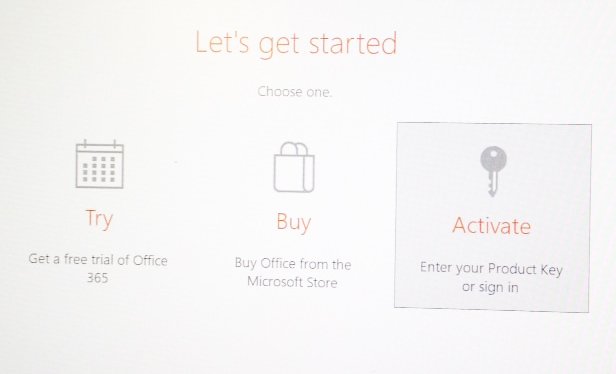
Microsoft Office Activation Wizard
Tags: How do I stop Microsoft Office pop up activation,How do I get rid of Office 2016 activation popup,How do I activate Office 365 without a product key,How do I remove Office 365 license from my computer,How do I stop Microsoft Office Activation Wizard from popping up,How do I stop Office 365 activation pop up

Also, check the below article

Flush DNS Cache in Windows


Post Views: 5,281

Related posts:

  1. How to Check if Your Hard Disk Drive is SSD or HDD
  2. How to Move Windows 10 from HDD to SSD-Step-by-step guide
  3. Windows Safe Mode to Solve Important drivers and malware issues
  4. Free Online Tools for web statistics Analysis
  • How do I activate Office 365 without a product key
  • How do I get rid of Office 2016 activation popup
  • How do I remove Office 365 license from my computer
  • How do I stop Microsoft Office Activation Wizard from popping up
  • How do I stop Microsoft Office pop up activation
  • How do I stop Office 365 activation pop up Also
  • Leave a Reply Cancel reply

    Your email address will not be published. Required fields are marked *

    Categories

    Android Apple MacBook Pro Artificial Intelligence(AI) Automobile Banking Business Computer Cybersecurity Digital Marketing Etisalat Finance Gaming General General Knowledge Google Health and Medicine Hosting Instagram-Reels Instagram Tips Internet iPhone Malayalam Microsoft Mobile Phones Movies Networking News Photoshop Tips PHP PUBG Mobile SEO SMO Softwares Technology TikTok Travel and Tourism UAE Guidelines uae news Web development Website Development Web Tips WhatsApp Windows windows 10 wordpress
    •  Cybersecurity tips for small businesses
      by Smart Techie
    •  How to make a Virtual Zero Balance Bank Account in India
      by Sijo Thomas
    •  Most Popular Foods in America
      by Smart Techie
    • 10 Steps to Building a Solid Data Management Plan
      by Sijo Thomas
    • 10 Ways to Tell I am Not Coming to Office Today
      by Smart Techie
    • 20 Years of World of Warcraft: How the MMO Keeps Reinventing Itself
      by Sijo Thomas
    • 3 Easy Ways to Grow Your Business Through Instagram
      by Sijo Thomas
    • 5 Best Jesus Piece Pendants
      by Smart Techie
    • 5 Best Search Engines in the World
      by Smart Techie
    • 5 Company Swag Ideas for Employees To Celebrate Corporate Wins
      by Sijo Thomas
    • 5 Free Vs Paid AI Tools
      by Smart Techie
    copyrights ©SWS 2017-2026
    ©2026 Internet Tips & Tricks | Powered by Superb Themes