
Menu
Smart Web Solutions
  • Home
  • General
  • Web Tips
    • Web development
    • PHP
    • zendframework
    • SocialEngine
    • SQL
    • javaScript
  • Internet
  • Free Web Tools
  • Contact Us
Smart Web Solutions
how to remove music from lock screen ios 15,how to remove music player from lock screen ios 14,how to remove music player from lock screen ios 13,how to remove music widget from lock screen ios 15,how to remove music player from lock screen iphone,iphone music player not showing on lock screen,how to remove music from lock screen iphone 11

How to remove music App from lock screen iOS 15

Posted on 10th January 202210th January 2022 by Sijo Thomas

Let’s see how to remove music App from lock screen iOS 15. If you are an iPhone user, then you might be aware of the music player where you can enjoy your favourite songs at any time. IOs 15 offer a lot of new and exciting features for you to enjoy and explore on your iPhone device. If you have a device that supports iOS 15 and 14, then you will be able to explore everything latest on your iPhone easily without any issues at all. There is a music player widget that is considered as the latest addition to this version of IOS.  With the help of this widget, you can control all your music files and also be able to play your music whenever you want to.
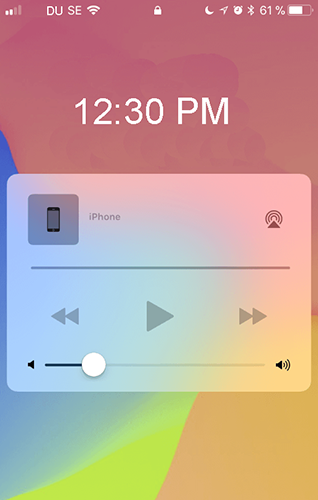
A screenshot of a phone Description automatically generated with medium confidence

If you want to remove the music player from the Lock screen IOS 15, then you should be aware of the steps you need to follow for doing it. Here are some of the steps you need to follow for removing the music player from Lock screen IOs 15.

Remove Music App from iPhone widgets

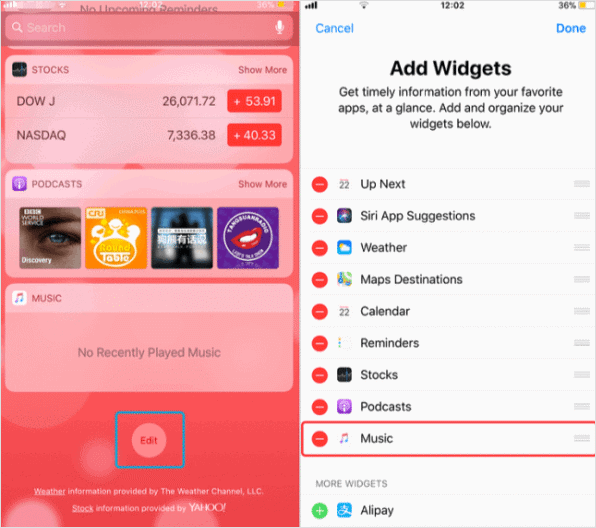
The first step which is you need to follow while removing the music player from the Lock screen IOS 15 is to remove music from your iPhone widgets. For doing this, you need to open iPhone on the home screen, and you should swipe right and tap to the screen bottom.
Graphical user interface, website Description automatically generated

You will notice an edit button and you need to click on the edit button. After clicking it, you are going to access the widgets manage window and you need to remove the music app from your iPhone Widgets.

Turn off Music App notification

Once you are done with removing music from iPhone widgets, then you need to turn off music app notifications from your side.

remove music from lock screen ios 15

After turning off the music app notification, you will never get any notification regarding any music you have played.

music App from lock screen iOS 15

It is easy to turn off your application and will hardly take a few minutes from your end.

Reboot iPhone

At last, you need to reboot your iPhone device after performing all the above-mentioned steps from your end. After rebooting your iPhone, the music player from Lock screen IOs 15 will be removed. For doing this, you need to hold the lock button and down volume button at the same and your iPhone will turn off and back on. It would be better for you to understand that Rebooting iPhone is useful and easy. Rebooting is one of the safest and highly recommendable steps you can follow to get rid of the issue you are facing with your IOS 15.

Finally, you are aware of the vital steps you need to remove music App from lock screen iOS 15 on your device. If still, you are not able to get rid of the music player from Lock screen Ios 15, then you should check out the apps which have been uninstalled on your device for sure. These apps may have left some files that are raising the issue and you need to remove those files before proceeding further.

Author

  • sijo thomas
    Sijo Thomas

    Sijo Thomas is a web developer, SEO-focused content creator and digital tools builder at Smart Web Solutions. He creates practical web tools, technology guides and helpful online resources covering web development, WordPress, SEO, artificial intelligence and everyday digital solutions. His work focuses on making technology easier to understand and providing useful, user-friendly solutions for individuals and businesses.

    LinkedIn:https://www.linkedin.com/in/sijo-thomas-it-seo-and-dm/

    Facebook:https://www.facebook.com/sijothomasmaprayil

    Instagram:https://www.instagram.com/s14_sijothomas/

Post Views: 1,263

Related posts:

  1. Find the serial number of AirPods
  2. Share Wi-Fi password from your iPhone, iPad, or iPod touch
  3. How to Free Up Space On Your iPhone and iPad-8 Simple Tips Explained Here
  4. How to fix iPhone 11 battery drain issue with the latest iOS 14.5 update
  • how to remove music from lock screen ios 15
  • how to remove music from lock screen iphone 11
  • how to remove music player from lock screen ios 13
  • how to remove music player from lock screen ios 14
  • how to remove music player from lock screen iphone
  • how to remove music widget from lock screen ios 15
  • iphone music player not showing on lock screen
  • Leave a Reply Cancel reply

    Your email address will not be published. Required fields are marked *

    Categories

    Android Apple MacBook Pro Artificial Intelligence(AI) Automobile Banking Business Computer Cybersecurity Digital Marketing Etisalat Finance Gaming General General Knowledge Google Health and Medicine Hosting Instagram-Reels Instagram Tips Internet iPhone Malayalam Microsoft Mobile Phones Movies Networking News Photoshop Tips PHP PUBG Mobile SEO SMO Softwares Technology TikTok Travel and Tourism UAE Guidelines uae news Web development Website Development Web Tips WhatsApp Windows windows 10 wordpress
    •  Cybersecurity tips for small businesses
      by Smart Techie
    •  How to make a Virtual Zero Balance Bank Account in India
      by Sijo Thomas
    •  Most Popular Foods in America
      by Smart Techie
    • 10 Best Remote Job Websites to Find Work-From-Home Jobs
      by Sijo Thomas
    • 10 Steps to Building a Solid Data Management Plan
      by Sijo Thomas
    • 10 Ways to Tell I am Not Coming to Office Today
      by Smart Techie
    • 20 Years of World of Warcraft: How the MMO Keeps Reinventing Itself
      by Sijo Thomas
    • 3 Easy Ways to Grow Your Business Through Instagram
      by Sijo Thomas
    • 5 Best Jesus Piece Pendants
      by Smart Techie
    • 5 Best Search Engines in the World
      by Smart Techie
    • 5 Company Swag Ideas for Employees To Celebrate Corporate Wins
      by Sijo Thomas
    copyrights ©SWS 2017-2026
    ©2026 Smart Web Solutions | Powered by Superb Themes